TLS 1.2 Requirements
 |
The industry-wide deadline for TLS 1.2 support was June 2018. Without the TLS 1.2 updates, you will not be able to process credit cards online.
|
These steps must be performed on all computers that need to process credit cards.
 Internet Explorer 11 must be installed
If your computers connect to a server using Remote Desktop Services (RDS), you must check that TLS 1.2 is enabled for each Windows User that connects to the server. These settings are enabled per user in their RDS session.- The following operating systems ARE NOT SUPPORTED!

Windows XP Windows Server 2003 (All Versions) Windows Vista Windows 8 (8.1 is supported) Windows Server 2008 (2008 R2 is supported) - NET Framework 4.7.1 or newer must be installed on all computers where credit cards are processed. In a Remote Desktop environment, this includes the server. It may work with an older .NET Framework, but this is the one we have tested and verified.
Microsoft .NET Framework
- Make sure your operating system is up to date on all updates. TLS 1.2 was broken by a Windows update and was fixed by a later update.
- Windows 10
Make sure you have all Windows Updates and the latest .NET Framework. We're not able to determine which update fixes the TLS 1.2 issue but tests on computers that have all updates as of April 5, 2018 are working properly.
- Windows Server 2016
Make sure you install all available cumulative updates.
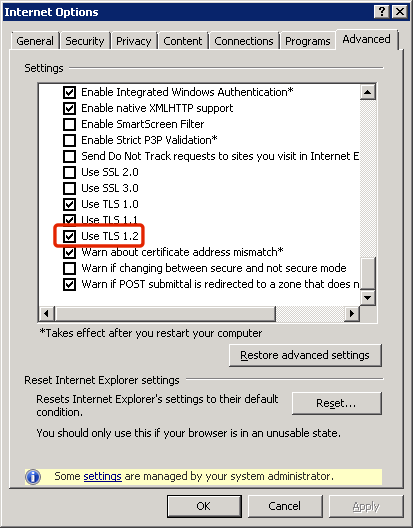
- Windows Server 2012 R2 and Windows 8.1
Apply this patch from Microsoft. It's been tested on our servers and fixes the problem.
https://support.microsoft.com/en-us/help/3154520/support-for-tls-system-default-versions-included-in-the-net-framework
- Because we use tools provided by Microsoft to perform certain functions, we also rely on them to encrypt the data. In order to do this, you are required to install at least version 10 of Internet Explorer, though Internet Explorer 11 is preferred. Since older, un-patched versions of Internet Explorer 10 do not enable TLS 1.2 by default, the following link contains information on enabling it.
Shift4 i4Go V2 Requirements
| Failure to addresses these issues will result in interruptions of your electronic credit card processing interfaces. We apologize for any inconvenience, but this is not an Execu/Tech requirement; this is an industry requirement. Older encryption protocols have been compromised, and the new protocols are necessary to ensure the security of customer cardholder data. |
|
TLS compatibility Checker
To help you determine if your computer is able to use TLS 1.2, we've created a simple utility that will tell you.
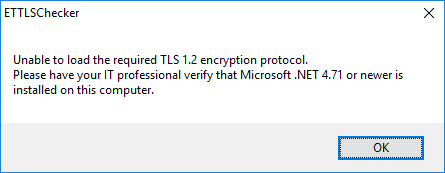
Unable to load the required TLS 1.2 encryption protocol. Please have your IT professional verify that Microsoft .NET Framework 4.7.1 or newer is installed on this computer.
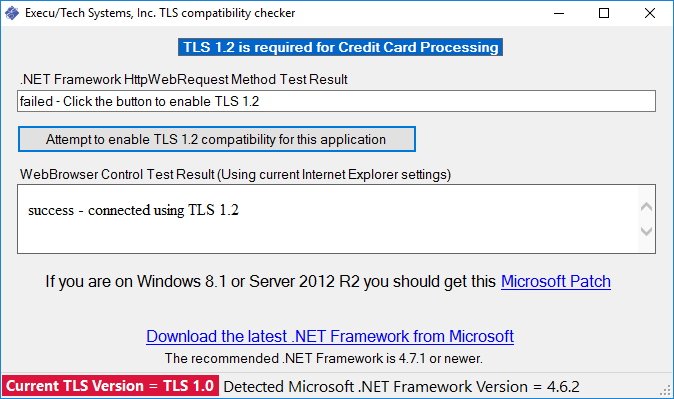
Click OK, and the window below will open.
If Internet Explorer is up to date, then it will likely pass the test even if the HttpWebRequest Method test fails.
In this image you can see that the .NET Framework that's currently installed is 4.6.2, so an upgrade is necessary. Even though the .NET framework might not be the latest version and should be updated, you might also need to do some Windows updates, so check that as well.
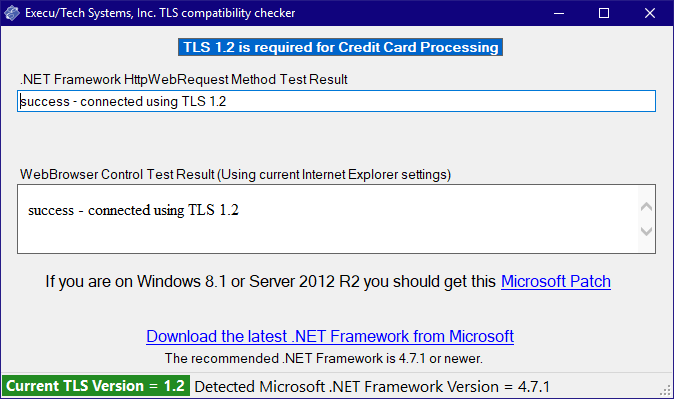
If .NET Framework is up to date and you have Windows 8.1 or Server 2012 R2, you should install this Microsoft patch.
|
|
OTA / HTNG Reservation Interface Customers with an OTA / HTNG Reservation Interface (Travelclick, Synxis, Vertical Booking. etc.) must check with the appropriate vendor to determine the TLS cutoff date. They may require TLS 1.2 on your server to continue reservation delivery. If you are a Cloud Hosted customer there is nothing you need to do because we take care of this.Instructions for enabling TLS 1.2 can be found here: OTA / HTNG Installation and Configuration |
 Software Developers:
We spent quite a bit of time searching for a solution to this and were unable to find definitive information in one location, so we put it together on this page. If you're a software developer and came here hoping to find out how to implement TLS 1.2 in Microsoft .NET 2.0 assemblies or applications, these instructions may work for you. The compatibility checker is written using the .NET 2.0 framework so it will show if your computer is ready to support TLS 1.2 from a .NET 2.0 application.
This has been tested and works with Windows 7, 8, 8.1, 10, Servers 2008, 2012, 2016 and 2019.
After installing the latest .NET framework and applying any necessary patches on the computer, including all cumulative updates, use this code to implement TLS 1.2 in a .NET 2.0 assembly or application.
In VB.NET
System.Net.ServicePointManager.SecurityProtocol = DirectCast(3072, System.Net.SecurityProtocolType)In C#
System.Net.ServicePointManager.SecurityProtocol = (System.Net.SecurityProtocolType)3072;