Each POS item must have a valid revenue department code. Therefore you must set up at least one department such as FOOD, BOOKS, etc. You can set up as many as you wish. POS Revenue codes are set up in Department Records.
If your POS outlet is affiliated with a hotel using Execu/Suite PMS, then each POS revenue department must reference a valid Hotel charge code. Each POS revenue department can reference more than one Hotel charge code. For example, POS department FOOD can reference Restaurant Food and Bar Food if you wish to track them separately. You must set up valid Hotel Charge Codes. This is important so that the POS outlet's sales and receipts will print on the hotel's audit reports and will be included in the property's total statistics.
There are three ways to designate Hotel Charge codes for POS Revenue Departments:
Option 1: You can keep it simple, with each POS revenue department referencing a single Hotel Charge Code. See Using One Hotel Charge Code per POS Revenue Department.
Option 2: You can point each POS revenue department to multiple Hotel Charge Codes. This is done by designating the charge code by terminal number. For example, FOOD at Terminal 21 can reference Restaurant Food and FOOD at Terminal 31 can reference Bar Food. See Designating multiple Hotel Charge Codes per Revenue Department by Terminal Number.
Option 3: You can set one primary Hotel Charge Codes and a secondary Hotel Charge Code, which is designated by Menu number. For example, if your bar uses Menu 7 for bar food and other menus apply to restaurant food, then you can set restaurant food as the primary and all terminals using Menu 7 as bar food. See Designating secondary Hotel Charge Codes per Revenue Department by assigning a Revenue Center.
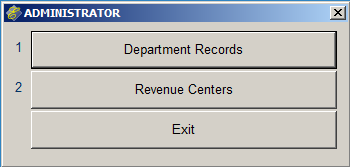
Go to POS Administrator - Departments/ Revenue Centers. Set up Department Records. You only need to set up a Revenue Center for Option 3.
Option 1: Using One Hotel Charge Code per POS Revenue Department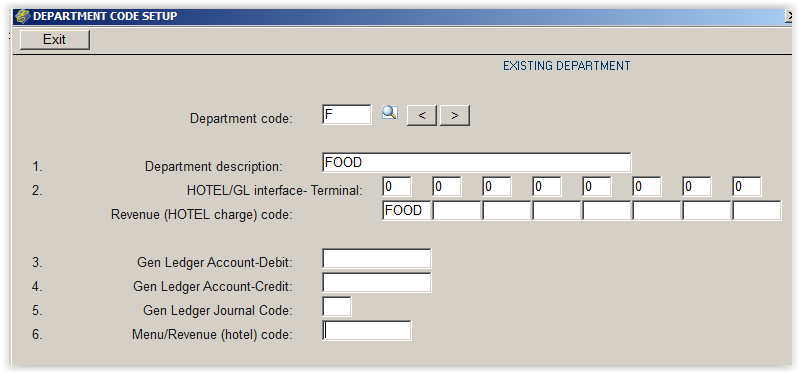 Each department must have a Department code. This is the record "key" and cannot be changed later. The department code is what you will enter into each menu item belonging to this department. Case matters; B is not the same character as b. You also may use numbers. Each code may be up to four characters but it is easier to use only 1 character per code. When looking up existing Department Codes click the magnifying-glass look-up icon. To look at all codes you can select one from the look-up list and then use the left-arrow and right-arrow (less-than and greater-than) buttons to select the next or previous one. "Department description:" may be up to thirty characters. Examples are FOOD, BEVERAGE, LIQUOR, WINE, BOOKS, CLOTHING, JEWELRY. "HOTEL/GL interface-Terminal:" can be left blank if all sales of items in this department should go to the same hotel charge such as FOOD or GIFT. "Revenue (HOTEL charge) code:" can be left blank if all sales of items in this department should go to the same Hotel charge code such as FOOD or GIFT. "Gen Ledger Account-Debit:" is used only for stand-alone systems using Back Office but not using Execu/Suite PMS. Your accountant will provide this information to you. "Gen Ledger Account-Credit:" is used only for stand-alone systems using Back Office but not using Execu/Suite PMS. Your accountant will provide this information to you. "Gen Ledger Journal Code:" is used only for stand-alone systems using Back Office but not using Execu/Suite PMS. Your accountant will provide this information to you. "Menu/Revenue (hotel) code:" can be left blank. Optionally, you can designate an additional hotel charge code for this department based on menu. For example, 4/DFD would designate DFD (dinner food) for items sold during the time period of Menu 4 (see Terminal records for menu setup). |
Option 2: Designating multiple Hotel Charge Codes per Revenue Department by Terminal Number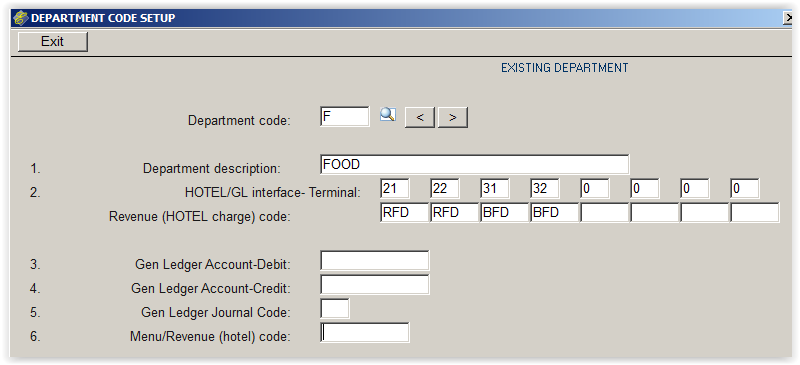 Each department must have a Department code. This is the record "key" and cannot be changed later. The department code is what you will enter into each menu item belonging to this department. Case matters; B is not the same character as b. You also may use numbers. Each code may be up to four characters but it is easier to use only 1 character per code. "Department description:" may be up to thirty characters. Examples are FOOD, BEVERAGE, LIQUOR, WINE, BOOKS, CLOTHING, JEWELRY. "HOTEL/GL interface-Terminal:" is used when sales from different workstations should point to different charge (revenue) codes in Hotel. This line goes with "Revenue (HOTEL charge) code" which is on the next line. Here's how it works: For example, if Terminals 21 and 22 should post food sales to RFD for Restaurant Food and Terminals 31 and 32 should post to BFD for Bar Food, you would put 21 in the first terminal field, 22 in the second terminal field, and so on. This is illustrated in the above image. You would then put the charge codes in the line below, underneath each terminal number. "Revenue (HOTEL charge) code:" is where you place the Hotel charge code (such as RFD) that sales of items in this department should go for the designated Terminal number you entered in the "HOTEL/GL interface-Terminal:" fields. Each terminal will point to its own Hotel Charge Code as shown in the image above. "Gen Ledger Account-Debit:" is used only for stand-alone systems using Back Office but not using Execu/Suite PMS. Your accountant will provide this information to you. "Gen Ledger Account-Credit:" is used only for stand-alone systems using Back Office but not using Execu/Suite PMS. Your accountant will provide this information to you. "Gen Ledger Journal Code:" is used only for stand-alone systems using Back Office but not using Execu/Suite PMS. Your accountant will provide this information to you. "Menu/Revenue (hotel) code:" can be left blank. |
Option 3: Designating secondary Hotel Charge Codes per Revenue Department by assigning a Revenue Center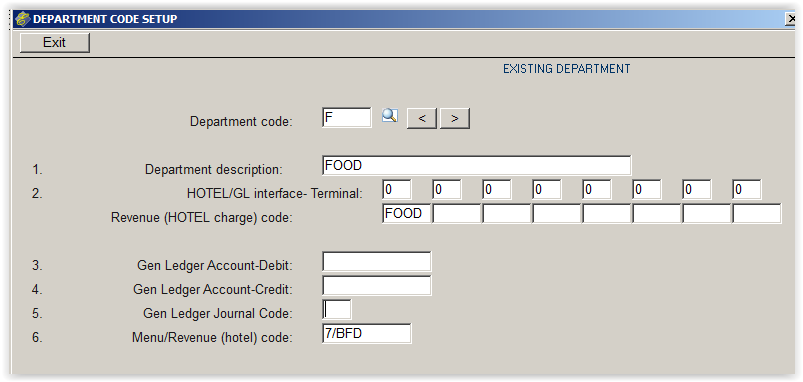 Each department must have a Department code. This is the record "key" and cannot be changed later. The department code is what you will enter into each menu item belonging to this department. Case matters; B is not the same character as b. You also may use numbers. Each code may be up to four characters but it is easier to use only 1 character per code. "Department description:" may be up to thirty characters. Examples are FOOD, BEVERAGE, LIQUOR, WINE, BOOKS, CLOTHING, JEWELRY. "HOTEL/GL interface-Terminal:" can be left blank. It will default to 0 (zero) which is fine. "Revenue (HOTEL charge) code:" is where you place the primary Hotel charge code (such as FOOD) that sales of items in this department should go. Items from a specific menu can go to a different Hotel charge code as explained below in "Menu/Revenue (hotel) code:". "Gen Ledger Account-Debit:" is used only for stand-alone systems using Back Office but not using Execu/Suite PMS. Your accountant will provide this information to you. "Gen Ledger Account-Credit:" is used only for stand-alone systems using Back Office but not using Execu/Suite PMS. Your accountant will provide this information to you. "Gen Ledger Journal Code:" is used only for stand-alone systems using Back Office but not using Execu/Suite PMS. Your accountant will provide this information to you. "Menu/Revenue (hotel) code:" is used when a menu (1 through 8) is used to define the revenue code rather than using the terminal number. This is convenient when multiple terminals run from the same Store. For example, if Menu 7 is the bar, then sales of an item from Menu 7 will go to the revenue code designated for that. It would be entered as this example: 7/BFD. This field is optional and overrides the terminal setting. You must set up Revenue Centers to use this feature. See next section for further details. |
Revenue Centers: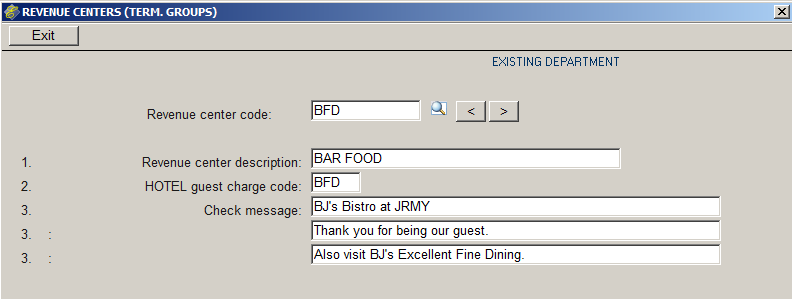 Revenue Centers are used when you wish to assign Hotel Charge Codes by menu rather than by terminal number. They are used in conjunction with the "Menu/Revenue (hotel) code:" field in the Revenue Department setup. Here is how it works. Say you have hamburgers in Menus 2, 3, and 7. Say Menu 7 is the bar and all bar terminals use Menu 7. Say hamburgers are in revenue department F. You would set up revenue department F and point it to a hotel charge code such as RFD for restaurant food. If you want hamburgers sold in the bar to point to a different hotel charge code such as BFD (bar food) you would set up BFD as a Revenue Center Code. Then, you would fill in the "Menu/Revenue (hotel) code:" field as follows: 7/BFD. "Revenue center code " is the code that you will place in the "Menu/Revenue (hotel) code:" field in the Department Code setup. "Revenue center description:" is the description for this revenue center. "HOTEL guest charge code:" is the Hotel charge code that the system should post to a folio when ROOM CHARGE or ACCOUNT CHARGE is selected when closing the POS check. For this Revenue Center, this code overrides the default HOTEL Guest charge code that is set up in the Hotel setting in the Store Record. This code's description prints on the guest or master folio. "Check message:" will allow you to enter a message to print on a guest check for this revenue center. This overrides the default message in the Store Record. |
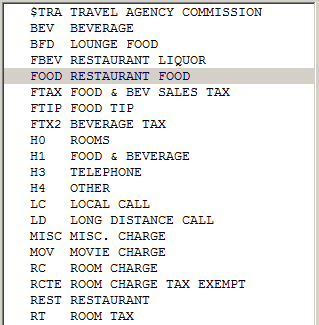 |
At left are samples of Hotel Charge Codes. Some of them are used for transactions from POS. BEV, BFD, FBEV, and FOOD are examples of Hotel Charge Codes representing POS Revenue Departments. Other Hotel Charge Codes are used for POS transactions but are not considered revenue. FTAX, FTX2, FTIP are examples of transactions that would post in POS but are not considered "revenue". These codes would NOT be referenced in POS Revenue Department setup. Clearing codes are used internally when a check is closed to ROOM CHARGE or ACCOUNT CHARGE. REST is an example. This code does not represent revenue and would NOT be referenced in POS Revenue Department setup. See Store Record and Night Audit Procedures for more information on Clearing Codes |
|
Execu/Tech Systems offers professional training. We can come to your property or train you remotely. Email support@execu-tech.com for a quote or to schedule your trainer. |
 Related Files
none..
Related Pages
none..